psi-slides · back to In the room · Diese Seite auf Deutsch
The prompter
The cockpit, the window only the speaker sees, can listen while you talk. When something needs saying, the prompter puts a short hint on a strip across the bottom of the cockpit’s copy of the slide. Most of the time it says nothing.
It stays off unless you switch it on.
Start node build.js on the command line with
--watch --prompter (the desktop app cannot run
it), and even then nothing listens until you press Shift-S in
the cockpit, or the ◌ prompter button in its footer, which does
the same. Press it again and it stops listening.
It goes online, and it costs money. It asks a language model over the internet, so the talk needs a network connection and an API key from an OpenRouter account, and each call to the model is charged to that account. The microphone hears everyone in the room; tell them before you start.
What it whispers
It speaks up when you are behind time, when a point stays abstract although your slides have an example for it, when what you just said contradicts your own slide, when you are speaking too fast, or when your notes planned something for this slide and you have walked past it. psi-slides counts the tempo itself and gives the model the numbers: words a minute, filler sounds, the longest pause.
In the picture, the slide says 90 milliseconds, and the speaker has just said “I think it was 250 milliseconds”. The red strip carries the prompter’s answer, word for word as the model gave it. It is red because the model marked it urgent, a level kept for something that would mislead the room if it stood.
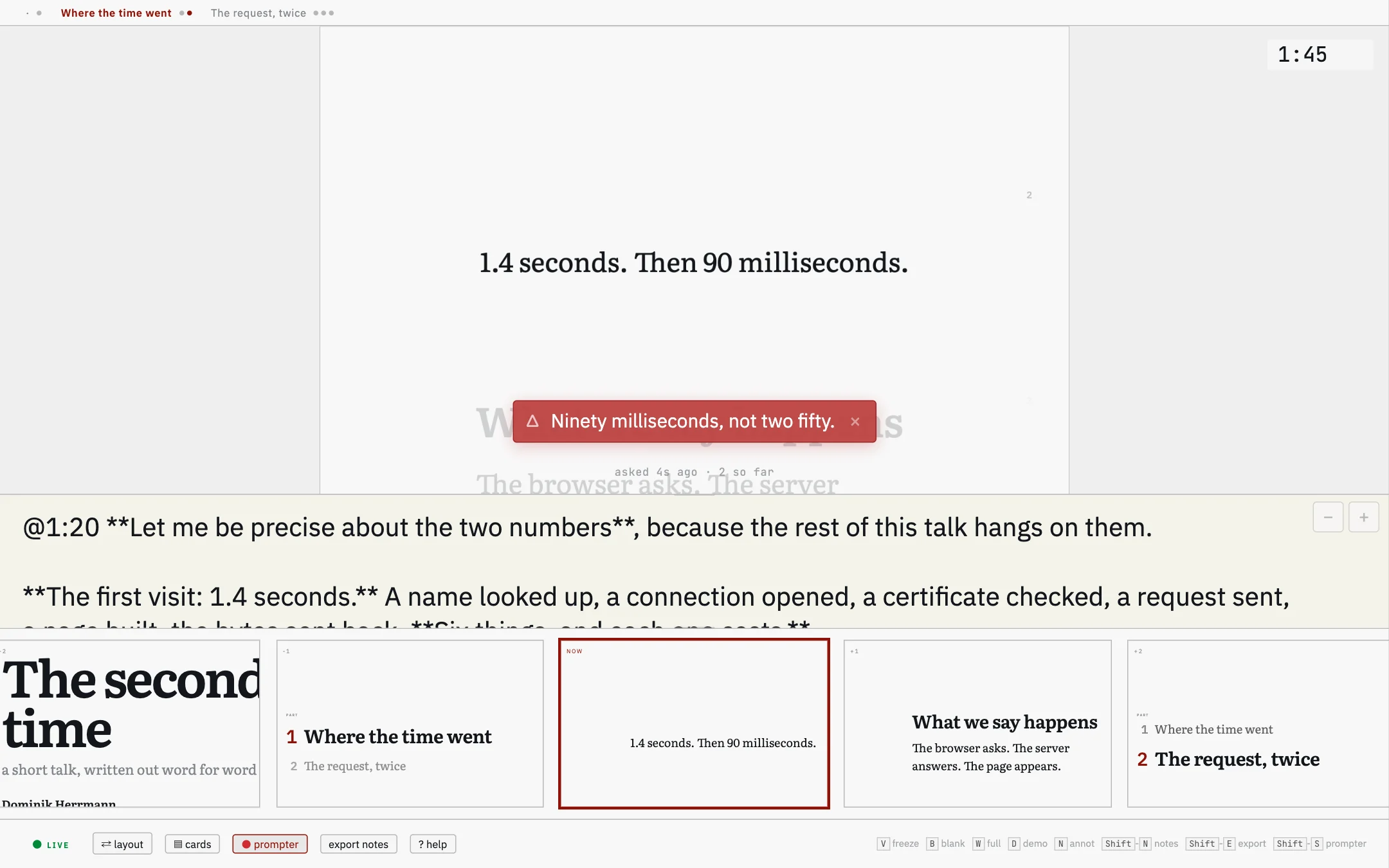
A hint stays in the cockpit. It stands on the cockpit’s copy of the slide and fades after 15 seconds, an urgent one after 25; Esc takes it off the strip sooner. Nothing the prompter says appears on the projection.
It can add a cue card to a slide still to come, the last slide included, when you said something in passing that is worth saying again there. K lays your speaker notes out as these cards, described on In the room.
The line under the strip shows, for the first minute, the words the speech recognition picks up. After that it says when the prompter last asked the model, so you can tell a prompter with nothing to say from one that has stopped.
What it needs
Chrome and --watch.
Chrome’s own speech recognition does the listening. The
--watch flag keeps node build.js
running and rebuilds the lecture whenever you save; the cockpit hands what
it hears to that running program, and the program asks a language
model. The desktop app cannot run the prompter: it does not pass
--prompter and has no network permission, so use the
command line.
The internet and an OpenRouter key. The model is
reached through openrouter.ai. You create an API key in an OpenRouter
account, which is also where the calls are paid for, and put it in the
file ~/.config/psi-slides/openrouter.key, readable by you
alone, or in the environment variable OPENROUTER_API_KEY.
Without a key the prompter runs as a rehearsal: it asks no model and only
writes what it hears into its log.
Money. One keynote, together with every rehearsal and test run before it, came to about one US dollar with the default model, Claude Sonnet 5. What a talk costs depends on the model and on how often the prompter asks. It makes at most 360 calls an hour unless you set a lower limit.
A rehearsal needs no key
--prompter-dry-run does everything
except call the model: it listens, keeps the clock and applies the rules on
when a hint may appear. Nothing goes to openrouter.ai, but Chrome still
sends the audio to Google unless it can recognise speech on your
computer.
The prompter: block in the settings at the top
of source.md sets the model, how much new speech the prompter
waits for before asking again, how long it stays quiet after a hint, whether it may
add cue cards, and how many calls it may make in an hour.
# in the settings at the top of source.md
# duration: the planned length in minutes, for the clock;
# cooldown: the seconds of quiet after each hint
duration: 45
prompter:
  cooldown: 60

# the talk: rebuilt, served, the cockpit opened in Chrome, and
# the prompter on, because of the prompter: block above
node build.js lectures/my-lecture/source.md --present

# a rehearsal: nothing goes to the model, no key needed
node build.js lectures/my-lecture/source.md --present --prompter-dry-run
What leaves your computer, and what stays on it
The prompter sends text to openrouter.ai: the
transcript and the lecture’s text, speaker notes included. From there
it goes to the company that runs the model. The prompter sends no audio,
but the speech recognition is Chrome’s, and Chrome sends the audio to
Google unless it can run the recognition on your computer; the cockpit
tells you which. None of this appears on the projection or is written into
source.md. node build.js reads the key from the
environment and never writes it into the HTML files.
Each run writes a log beside source.md, in
prompter-<date>.jsonl: what the prompter heard, which
hints it showed, and what it wanted to say but its rules stopped, with the
rule that stopped it. Beside it, prompter-<hash>.prompt.txt
holds the lecture’s text exactly as the model received it. The log
holds your spoken words verbatim, so keep it out of repositories you
publish. During the talk, Shift-click the prompter button to
see the last ten hints and cards. After it,
node build.js source.md --prompter-debrief reads the newest
log back: when the clock started, how the talk kept to the
@mm:ss marks in your notes, and what the prompter whispered
and held back.
The microphone hears the whole room
Questions and remarks from the audience are transcribed and sent to the model like your own words. Tell the audience before the talk that the prompter is listening, and switch it off with Shift-S when someone from the room speaks, for example during questions.
Whether you may use it in your setting is for you to check: data protection law (in the EU the GDPR) and the personal rights of the people in the room cover their words too.
Where to read further
- What psi-slides is The front page: one lecture as the room sees it and as the reader gets it, and why those are the same file.
- In the room The rest of the cockpit: the two windows, the steps, the cue cards the prompter can add to, and the keys that take the room’s eyes off the slide.
- Getting started The app and the command line, and how to build the tutorial from a machine with nothing installed on it.
- Security
What
--watch,--serveand--prompteropen on your computer, and where the prompter’s data goes, in one list.